





Security and governance remain high on the agenda for IT teams, particularly as collaboration platforms continue to evolve. Microsoft's latest update to Teams reflects this focus, introducing new controls that help organisations better manager external meeting bots and reduce the risks associated with third-party access to meetings.
Microsoft 365 administrators are under growing pressure to keep Teams secure without disrupting the tools employees rely on every day. Microsoft's new Teams policy allows administrators to automatically block identified external meeting bots from joining meetings, giving organisations greater control over how meeting data is accessed and shared.
The update is expected to reach General Availability (GA) in September 2026. While the security benefits are clear, the real challenge is understanding how the change could affect approved meeting tools already in use across your organisation.
AT-A-GLANCE
-
Microsoft Teams is introducing new controls to help organisations manage identified external meeting bots.
-
Administrators can automatically block detected external bots from joining meetings hosted within the organisation.
-
The update provides greater visibility and control over third-party access to Teams meetings.
-
Stronger meeting governance can help reduce security and compliance risks.
-
The change reflects Microsoft's wider focus on balancing collaboration, AI innovation and organisational security.

WHY MICROSOFT IS INTRODUCING THIS CHANGE
External meeting bots are commonly used by third-party applications to record, transcribe or analyse meeting content. Many provide legitimate business value, but they can also introduce governance, compliance and data protection concerns if deployed without appropriate oversight.
Until now, Teams could identify external meeting bots and provide visibility to meeting organisers and administrators. The new policy enables administrators to automatically block recognised external bots from joining meetings hosted within their organisation.
WHAT THE NEW POLICY ACTUALLY DOES
The Teams meeting protection policy provides administrators with the ability to:
-
Automatically block identified external meeting bots
-
Strengthen control over third-party access to meetings
-
Reduce the risk of unauthorised data collection
-
Support security and compliance requirements
-
Improve visibility into how external services interact with Teams
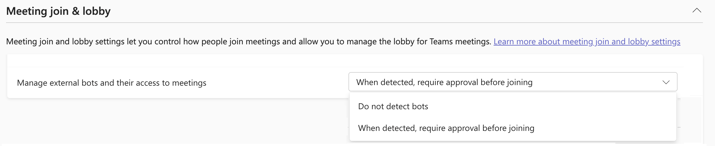
Figure 1: The new "Manage external bots and their access to meetings" setting in the Teams Admin Centre allows administrators to control how detected external meeting bots are handled when attempting to join meetings. Source: https://learn.microsoft.com/en-us/microsoftteams/manage-external-bots
For organisations with strict governance requirements, this adds another layer of protection around sensitive conversations and business information.
THIS IS WHERE PEOPLE GET CAUGHT OUT
The obvious question is whether external meeting bots create risk.
A more important question is whether your organisation relies on any of them today.
Many third-party recording, note-taking, accessibility and meeting intelligence tools use external bots to access Teams meetings. Enabling the policy without understanding these dependencies could disrupt established workflows and create confusion for users.
Before enabling the policy, consider:
-
Which third-party meeting tools are currently approved
-
Whether any services use external meeting bots
-
How recordings and transcripts are created today
-
Whether alternative Microsoft-native capabilities are available
-
Which stakeholders need to be informed before deployment
THE BIGGER RISK IS VISIBILITY
Security is only part of the conversation.
For many organisations, the challenge is understanding which third-party services have access to meeting content in the first place. The new policy gives administrators a clearer mechanism for restricting access, but it should form part of a broader review of meeting governance and collaboration security.
Blocking bots may reduce risk, by visibility into existing integrations is what enables informed decisions.
WHAT GOOD LOOKS OUT
A measures rollout should include:
-
Reviewing existing Teams integrations
-
Identifying approved third-party meeting services
-
Assessing the operational impact of blocking external bots
-
Piloting the policy with a small group
-
Communicating changes before wider deployment
The objective is not to block every bot. It is to ensure that access to meeting content aligns with your organisation's security, compliance and operational requirements.
NEXT STEP
Before enabling the policy, create an inventory of the meeting recording, transcription and productivity tools used across your organisation. This will help identify any services that depend on external meeting bots and allow you to assess potential impacts before rollout.
If you're unsure how the change may affect your Teams environment, speaking with a Microsoft specialist can help you evaluate existing integrations, understand the security implications and plan a rollout with confidence.
WHY INTERCITY?


As a leading UK Microsoft partner and proud member of the Microsoft Intelligent Security Association (MISA), we help organisations turn Microsoft's latest innovations into practical business outcomes.
From cloud modernisation and data platforms through to security, AI and Microsoft Copilot, we work alongside our customers to ensure they have the foundations, governance and expertise needed to adopt new technologies with confidence.
Our close alignment with Microsoft's strategy means we're able to understand what's coming next, but more importantly, translate it into meaningful opportunities for the organisations we support every day.
Whether you're exploring AI, strengthening your security posture or preparing your data and cloud environment for the future, our focus remains the same: helping you realise measurable value from your Microsoft investment.